
Your options at a glance
AI assistants explained: help for you and your visitors
An AI assistant understands everyday questions and helps with a specific task. In Shopyai, the owner assistant supports you in your workspace. The visitor chat helps people on your website find information and understand the next step.
Published by ShopyaiUpdated on
- Prepare copy
- Answer questions
- Involve your team
Put it into practice with Shopyai
1.Choose one task
Start with common questions about your services or a draft for one page. A clear goal makes answers easier to check.
2.Provide reliable information
Keep services, coverage area and contact options current on your website. Decide which questions your team should answer personally.
3.Test answers and handovers
Try known and unknown questions in the visitor chat. Check supported handovers in Chat Centre and add any missing content.
Open product view
A helper for you. A helper for your visitors.
The two assistants have different roles. This keeps clear who receives information and who can initiate changes.
For you: the owner assistant
In your signed-in workspace, it helps draft text, explains relevant features and can use enabled website or SEO tools. Available actions depend on your permissions.
For example: “Make our service description easier to understand. Use only these facts and do not invent prices.”
For customers: the visitor chat
On your website, it helps with questions about services, published content and ways to get in touch. It uses available business information. You need to supply missing details.
For example: “Do you also work outside Vienna?” The answer needs a documented service area.
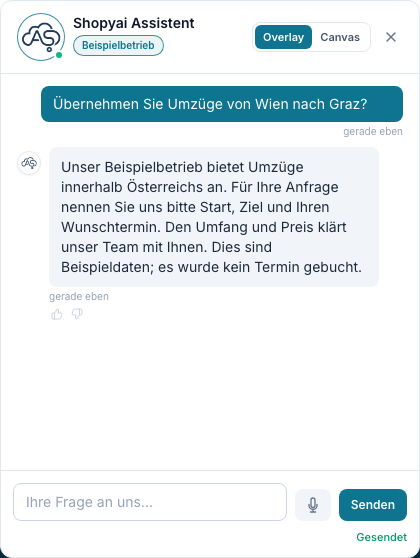
Here is what a conversation could look like
A transport company has described its service area and enquiry process on its website. The answer can draw on that information.
Visitor asks
“Do you handle moves from Vienna to Graz?”
Possible assistant answer
“According to our service information, we offer moves within Austria. For an enquiry, the starting point, destination and preferred date are helpful. Our team will discuss the exact scope and price with you.”
Next step: get in touch or hand over the enquiry. This does not yet book an appointment.
Your industry. An everyday example.
Trades, property or a law firm: the assistant helps people get started. These examples show possible paths, not automatic commitments.
Skilled trades
“What should I clarify before a bathroom renovation?”
How the assistant can help
Explain the published process and guide visitors to a consultation contact. The business discusses scope, a site visit and a quote individually.
Property
“How can I view this flat?”
How the assistant can help
Point to available property details and contact options. Only the responsible team or a suitable booking feature confirms a viewing.
Lawyers & law firms
“How do I contact the firm for an initial meeting?”
How the assistant can help
Explain published contact options, languages and office hours. Questions about a personal case go directly to the firm; the chat does not replace legal advice.
Fictional examples for illustration, not actual search data or AI recommendations. Describe the services and processes you actually offer.
What Shopyai provides
Good answers need good foundations. These three features connect content, practical tasks and collaboration with your team.
Look up information
Services, coverage areas, opening hours and frequently asked questions should be clear and current. The assistant cannot reliably know details that have not been provided.
The relevant Shopyai feature
Knowledge search and the visitor chat use available website and business content. After adding or changing content, check it with realistic test questions.
Review suggestions and changes
A suggested text starts as a draft. Check its facts, tone and intended change before using it.
The relevant Shopyai feature
The owner assistant shows a confirmation for protected changes. Some simple actions can run directly. Available tools depend on the setup.
Your team takes over
A person can help with an individual enquiry or unresolved question. Decide who will handle these conversations.
The relevant Shopyai feature
Chat Centre brings together supported handovers from the visitor chat. A live reply requires your team to be available; a handover does not guarantee an immediate answer.
Try three real customer questions
Start with a small, clearly defined use case. Check the answers and the contact path that follows.
A simple question: Does the answer about a service, location or opening time match your website?
An unknown question: Does the assistant explain when information is missing and offer a relevant contact option?
An individual enquiry: Does a supported handover actually reach your team? Who responds?
Use fictional details for testing. Check language, mobile layout and chat settings before using it with visitors.
The assistants support your work. Answers can contain errors. Binding quotes, appointment confirmations and professional decisions remain with the responsible people and systems.
Frequently asked questions about AI assistants
What is an AI assistant for a website?
An AI assistant processes questions in everyday language and generates answers. Shopyai’s visitor chat uses available information about your business. The separate owner assistant helps with content and enabled tasks in your signed-in workspace.
Is an AI assistant the same as AIO or GEO?
No. An assistant is a specific feature on your website or in your workspace. GEO and AIO concern how AI systems find and understand your content. Adding a chat alone does not make other AI services mention your business.
Does the assistant change my website automatically?
The visitor chat does not edit website content. Enabled tools in the owner assistant can perform actions. Protected changes require confirmation; some simple actions can run directly. Review both the displayed task and its result.
Can the chat confirm appointments or binding prices?
A chat answer alone confirms neither an appointment nor an individual price. That requires a suitable connected booking feature or confirmation by your team. The chat can explain existing information and guide people to the next contact step.
Is the assistant always available and unlimited?
Visitors can use the chat outside your office hours when it is enabled and technically available. Usage limits, your plan and enabled features still apply. A human live reply depends on your team’s availability.
Which questions should your website answer?
Bring three typical customer questions. We will discuss missing content and where an AI assistant could usefully support your business.
Discuss AI assistant for my website