
Your options at a glance
AIO explained: making your business recognizable
AIO has different meanings. Here it means describing your business clearly for AI systems. Shopyai supports this through Brand & Entity and checks on business information. This does not determine whether an AI model knows or mentions your business.
Published by ShopyaiUpdated on
- One clear name
- Connect relevant profiles
- Show real experience
Put it into practice with Shopyai
1.Describe your business
In Brand & Entity, enter the business name, responsible people and relevant official profiles. Include only accurate information.
2.Resolve inconsistencies
Brand & Entity checks flag missing or inconsistent details. Compare your website, contact page and external profiles.
3.Show your experience
Show real work and the people behind it. Keep information current. This supports a verifiable presence, but does not guarantee knowledge in an AI model.
Open product view
Three pages. Are they really the same business?
Anna runs a transport business in Vienna. The website uses a different company name from the old directory profile. A photo of a move does not name the business. Even a customer would struggle to connect them.
Before: you have to guess
- Website
- Example Removals · Vienna
- Official profile
- AB Transport · Graz
- Project report
- Moving project · no company named
After: the details fit together
- Website
- Example TransportRemovals and furniture transport in Vienna
- Official profile
- Example TransportRemovals and furniture transport in Vienna
- Project report
- Carried out by Example Transport · Vienna
AIO explained simply: a clear picture of your business
Here, we use AIO for the long-term work on how your business is represented around AI systems. Who are you? What do you offer? Which sources support that? It helps to distinguish two ways an AI can answer.
The AI looks things up
A service searches current web pages for a question and may link to them as sources. GEO focuses on this: making your page a useful source.
The AI uses what it learned
A model can also answer without a current web search. It uses patterns learned during training. You cannot directly set whether your business is included or what it says about it.
AIO and GEO overlap. This distinction explains our approach; the terms are not used the same way everywhere. You can improve your public details. That does not let you directly edit another provider’s model knowledge.
Shopyai cannot measure or control what another provider’s AI model has learned about your business. We help with the publicly visible foundations.
What this looks like in your sector
The services change. The basic idea stays the same: people should recognise who you are and what they can contact you for.
Transport & removals
Who can handle my move in Vienna?
Make this clear
Company name, service area and specific services, such as furniture transport and assembly. Add the person responsible and relevant official profiles.
Lawyer & law firm
Which law firm advises on tenancy law in Vienna?
Make this clear
The lawyer’s name, areas of practice, languages offered and the existing entry in the official lawyer directory.
Real estate
Who can help me sell my apartment in Vienna?
Make this clear
The agency name, area covered, services offered and the contact person responsible. These details should also be correct in your profiles.
Example questions for explanation. Only enter services and qualifications you actually offer or hold.
Four steps towards a clear overall picture
Start with what you know and can maintain yourself: your business, your website and your existing profiles.
1Describe the business clearly
Write your name, service and location in plain language. In our example: “Example Transport — removals in Vienna”. Also name the person behind the offer.
How Shopyai helps
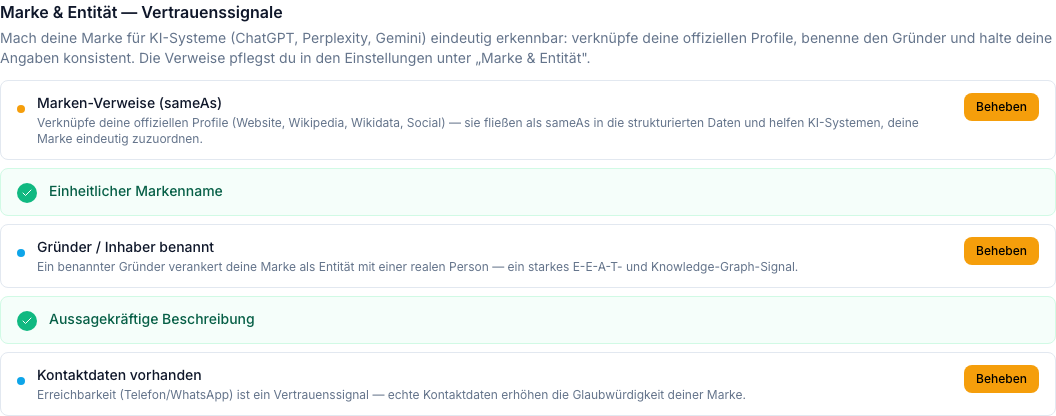
“Brand & Entity” shows checks on the details you have entered. You can edit them in settings.
2Connect relevant profiles
Only link profiles that really belong to your business. Check for yourself that the name, location and contact details there are current.
How Shopyai helps
Under “Other official listings”, enter existing profile links. Shopyai does not change those external profiles.
3Make experience visible
Show your own work and explain what your team did. For example, the transport business shows how it packed furniture for a move.
How Shopyai helps
The AI assistant helps with content planning. You supply and check real examples, images and facts yourself.
4Keep up with changes
The business has a new address? Update it on your website and official profiles. Old details then do not sit alongside new ones.
How Shopyai helps
Update your settings and pages. Then review the “Brand & Entity” checks again.
Here are the features that help
You do not need to train an AI. These features help you maintain the basics of your public presence.
Are your details complete?
Brand & Entity
“Brand & Entity” checks stored profile links, the name within your Shopyai data, and owner, description and contact details. It does not automatically search every profile on the web.
Which listings belong to you?
Other official listings
In settings, you save links to existing official listings. These references help describe their connection to your business.
Are the technical details correct?
Structured data
“Structured Data” checks details search engines receive in a technical format. You see error notices and can correct the underlying information.
Who may read your content?
AI crawlers & llms.txt
“AI Crawlers & llms.txt” offers settings for automated readers. You can allow search and training, allow only search, or block AI crawlers. Available when enabled; permission does not prove use in training.
Simplified feature illustrations. You maintain external listings yourself; available settings depend on your website and enabled features.
Connect your business to its profiles
In settings, under “Brand & Entity”, name the owner and link your official website and existing listings. Put simply, a link like this says: “This page belongs to us too.”
Brand & Entity
- Founder / owner
- Anna Example
- Official website
- https://transporte.example
- Other official listings
- https://verzeichnis.example/beispiel-transporte
Start small, keep it current
You do not need a hundred new listings. Start where your customers already look for you.
1Today
Check your website: are your name, service, location and contact details clear?
2Next
Review your most important existing profiles and add the relevant links.
3When things change
Update the details everywhere. Check occasionally even when nothing has changed.
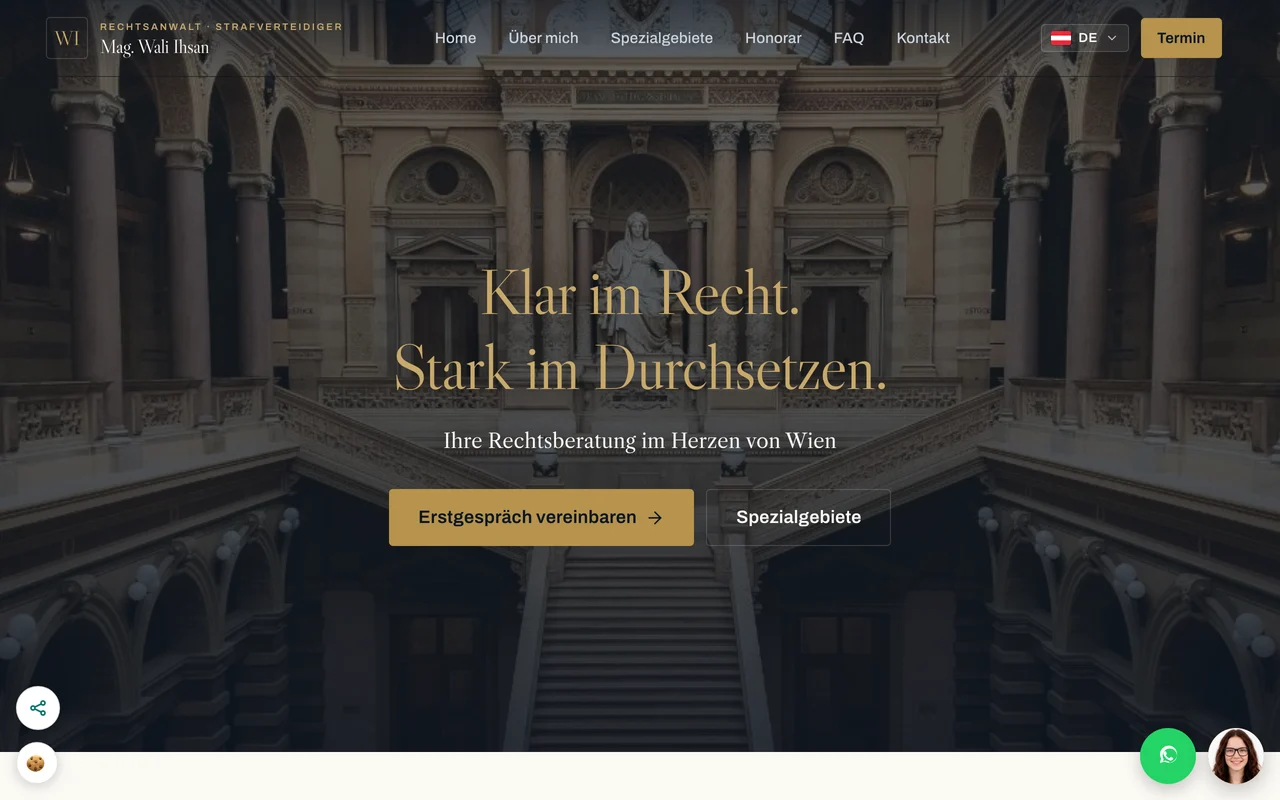
In practice
Ihsan law firm in Vienna
At Ihsan law firm, the name, portrait, practice areas, location and language versions form a coherent presence. Visitors can see who provides the service. Related profiles should maintain the same clarity.
Visit the law firm’s websiteThis example shows the website implementation. It does not demonstrate any particular Google ranking or AI mention.
More questions about AIO?
Can Shopyai add my business to an AI’s knowledge?
No. There is no button here that writes your brand into another provider’s AI model. Shopyai helps you maintain and check published details.
Do I need to be on Wikipedia?
No. Start with your website and relevant existing profiles. Wikipedia and other knowledge projects have their own rules; an advertising entry is no shortcut to AI visibility.
Is allowing AI training enough?
No. Access permission only means certain crawlers may read your content. It does not show whether the content is actually used in training or appears in a later answer.
How do I measure progress?
Check whether your details are complete, correct and current. Shopyai does not measure what an AI model has learned about your business. Individual test questions give snapshots, not reliable proof of training data.
For those who want to know more
Guidance on business details and helpful content from Google Search Central and Bing. Checked on 29 September 2026.
Make your business easier to recognise
We review your website, business details and existing profiles with you. Together, we turn them into manageable next steps.
Discuss AIO for my website